Company Details
 Nextpoint
Nextpoint is a litigation software used as a web application. Nextpoint helps attorneys, paralegals, litigation specialists, and other legal professionals with the entire litigation cycle.
There are parts of the application that focus on collecting/processing/importing data. There is a separate area for review. The last piece of the application is used for production.
The Team
- Product Owner
- Product Manager
- 1 Product Designer / Front End Developer
- 3 Front and Back End Developers
My Role
My involvement in the project varied: research, ideation, sketching, team communication, front end development, testing (QA), and user research/user feedback.
The Challenge
Folders were confusing to our users so they didn't use the folders and they were only one level deep.
Our program managers were constantly getting calls to help update or fix folder issues, so we decided to include it as part of a larger folder re-working. Instead of folders just being a top-level tag on documents to sort by, we wanted to allow the folders to be nested within another folder, or viewed, or sorted, and even allow users to star or favorite their most used folders. While there was no UX designer previously on the project, one of the biggest challenges we were facing is a full re-build.
The Process
Research
Deliver
Research
User Interviews
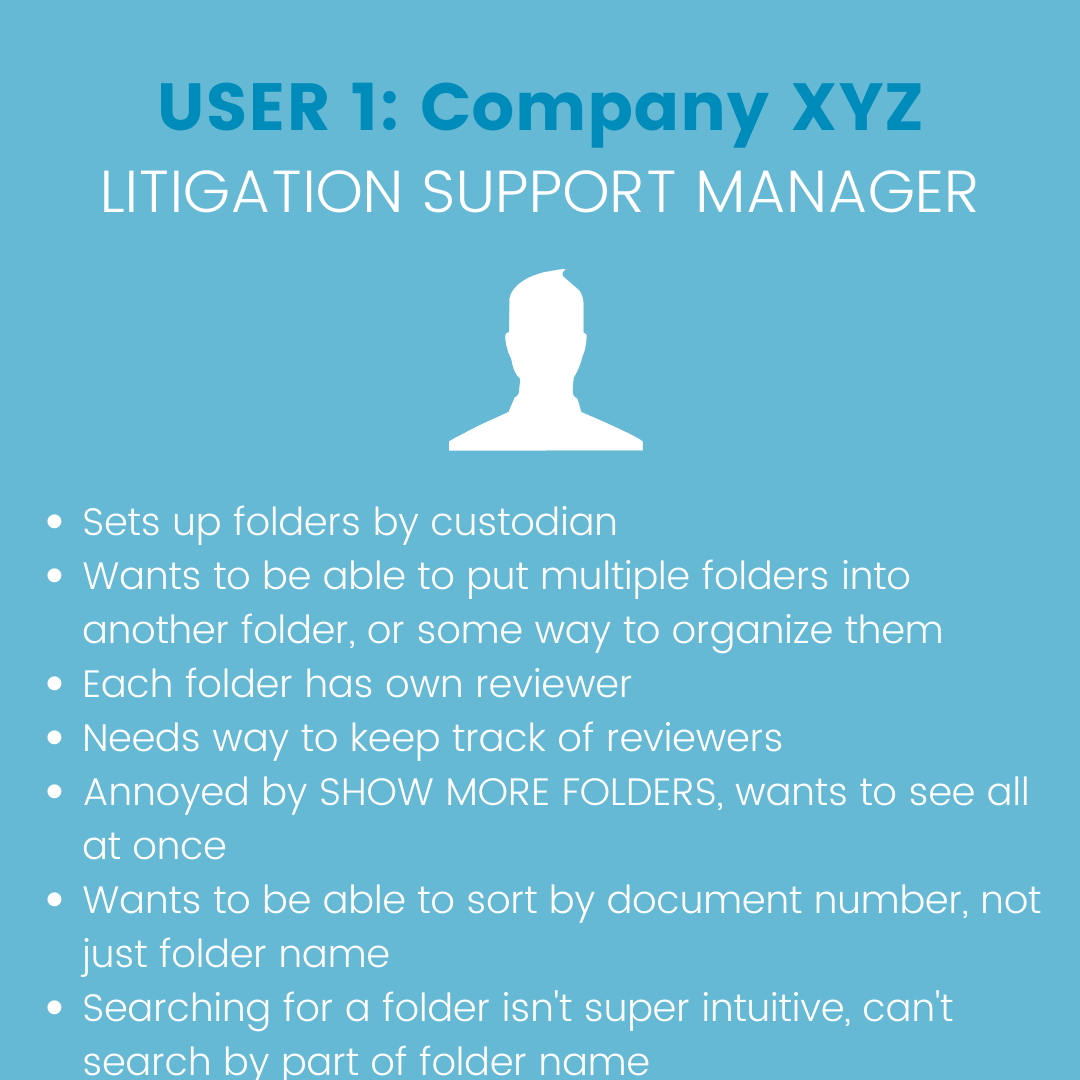
At the first meeting on a project, team I gathered all the information from our product owner, product manager, front end developers and back end developers. This helped us understand the history of the feature and all of the challenges we would be facing. Any other additional information was gathered in JIRA. To get a better understanding of our users' needs, we gathered additional details about their workflow within Review and which changes they needed most. Interviews were conducted either in Zoom or by phone.
Feedback Sessions & Surveys
During one of our weekly conferences with 3-5 of our power users, we conducted a feedback session. Showing them the current folder feature and walking them through the updates we had planned, we got invaluable feedback. When a question was asked about folders in our app, we connected with the user directly through Nextpoint. In this, we got a better idea of what our folders looked like, and we understood it is a similar setup in most apps. Feedback played a huge role in the following process. All the information was collected and recorded in JIRA, secured behind the project.
What We Discovered From Our Research
It is hard to view all their folders quickly
To organize their folders, needed, relevant one folder
There is a way to understand which folders exist of documents are within
To be able to sort their folders for better visibility
To have more information on which documents were in each folder without having to search for the folder
Quick access to folder settings (e.g. workflow) and not need to navigate to settings
JIRA Story Mapping
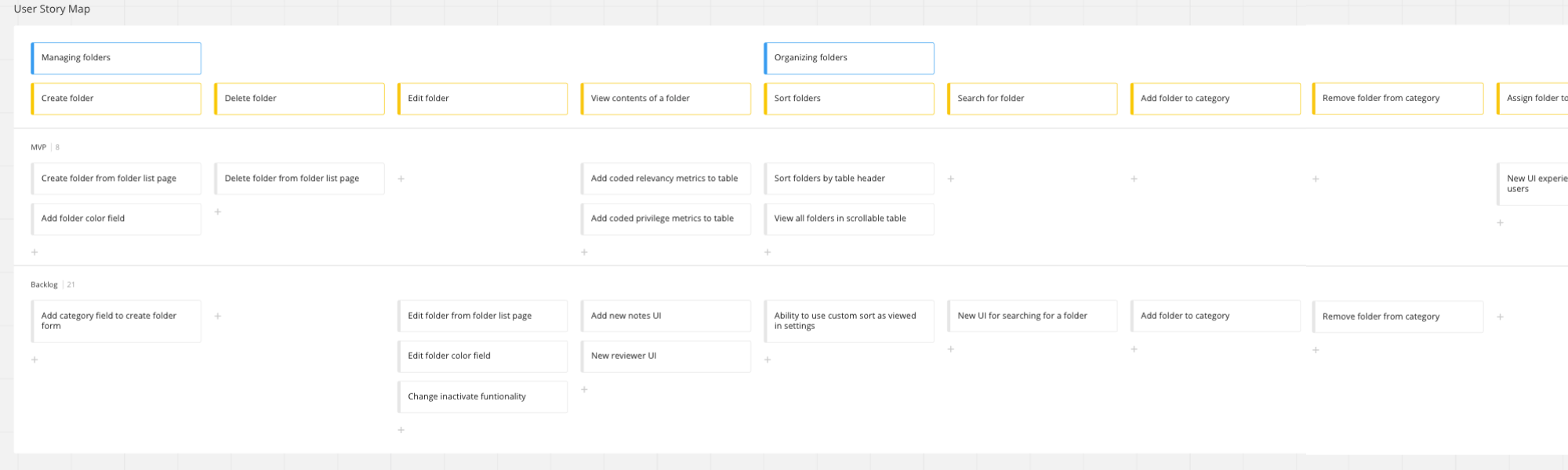
After the feedback session, data, and surveys, we had to create JIRA epics/stories for product updates. To help us scope down the project, I created a story map, which aided in narrowing down the priorities for each phase. We ended up doing a lot of the updates that were impossible to cut out of a single release, and the rest would be added later.
Ideate & Iterate
Sketches
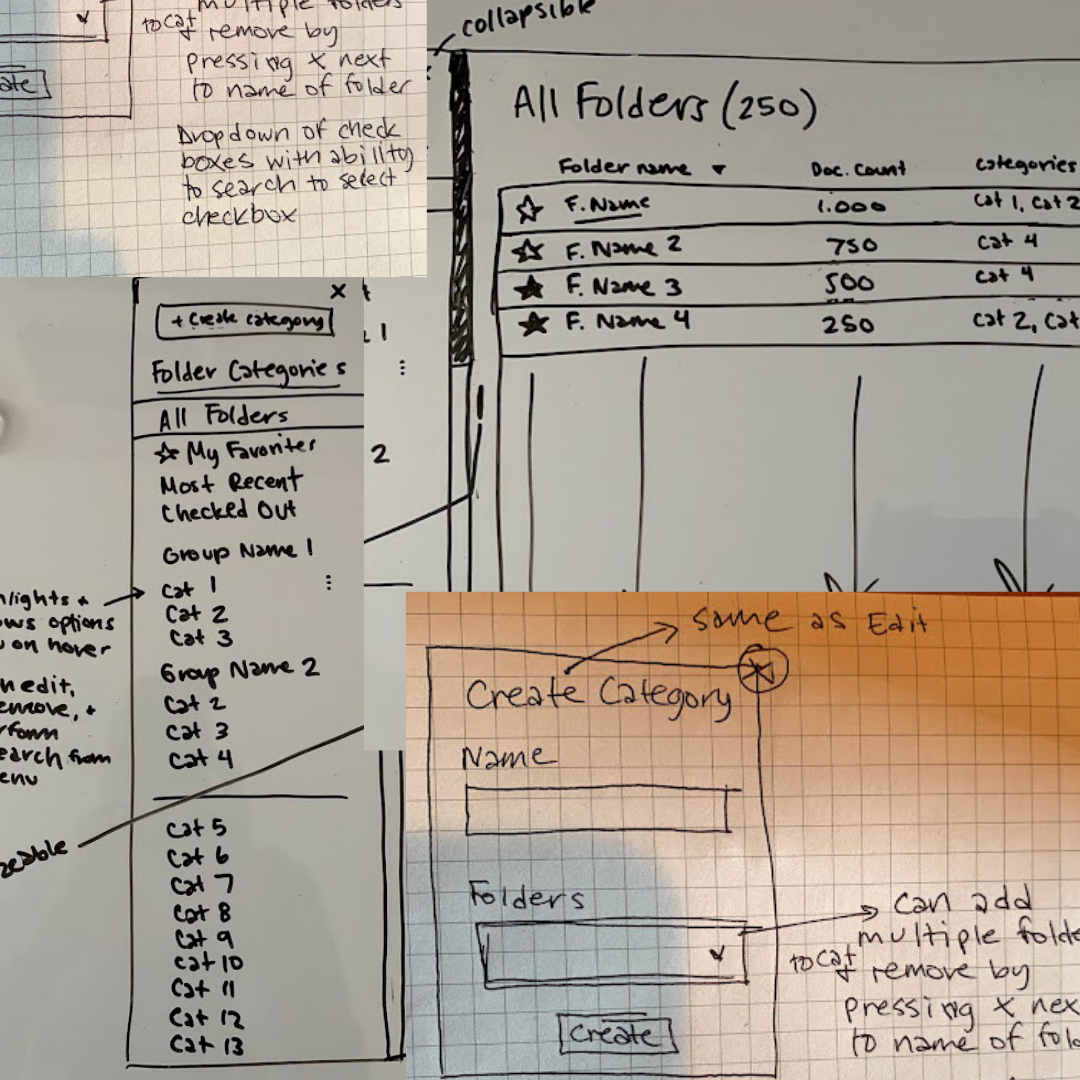
Once the work was determined, I got to work on rough sketches before creating the initial wireframes. They were a quick way of iterating and talking updates with the project. I ended up completing rough sketches on:
- A scrollable folder tree, rather than a paginated folder tab view
- An updated folder modal allowing editing all settings from a single view
- A way to favorite folders, so users could find their folders easier
- A way to search for folders
These helped the team and I have a frame of reference once they moved on from what to expect from the final product. All further sketching was done building on the concept.
High Fidelity Wireframes
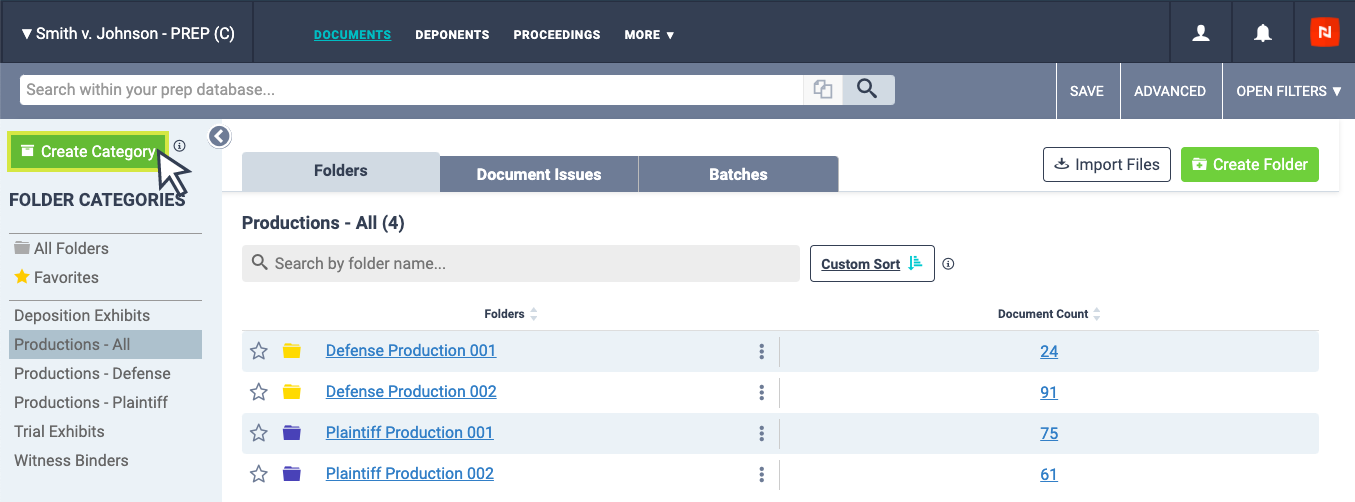
Because of the timeline of the project, I could go right to a high-fidelity wireframe. I wanted to get moving on development, building out the front end in HTML, CSS, and JavaScript. I reviewed and shared prototypes with our users for feedback on the concept. Once approved, the project was ready for development.
Develop & Deliver
Team Communication
Working at a startup with two developers dedicated to this project, plus a heavy technical product team — since the product team had/has a lot of experience, I could trust their judgment and let them know the architecture, and it really helped us understand our time. When there were questions about a JIRA ticket on how the feature should work, the developers came to me to go through the wireframes together. I communicated updates and changes from customer feedback to the developers and with other tools in our communication tool like Slack, Zoom, JIRA, Figma and Google Workspace to communicate documents and organize the work.
Front End Development
"Mostly" doing full builds on front end development, this most of the time is my preferred task. It is important for a developer to participate in the UI/UX process, so I was able to keep the design feasible within our Rails app. Since the other front end developers were dedicated to building the Ruby on Rails back end, my responsibility was focused on building the HTML, CSS, and JavaScript on the front end and making sure the front end builds were connected with the back end (data discovery and progress). Along with testing on all devices and browsers, the timeline was about 2 months. While there is no QA department, I was also checking production of the team and following the project requirements.
Testing & QA
During this time, one of our developers had moved into a review feature. The result meant that the front end QA process was a bit tighter as resources for testing changed. I had participated in most of the quality assurance of the original folder update project. This meant adding testing documentation in Confluence, verifying end to end with QA and dev teams, having the responsibility of accessibility, tablet and browser testing, making sure the existing full acceptance criteria was supported for browsers and devices.
The Final Feature
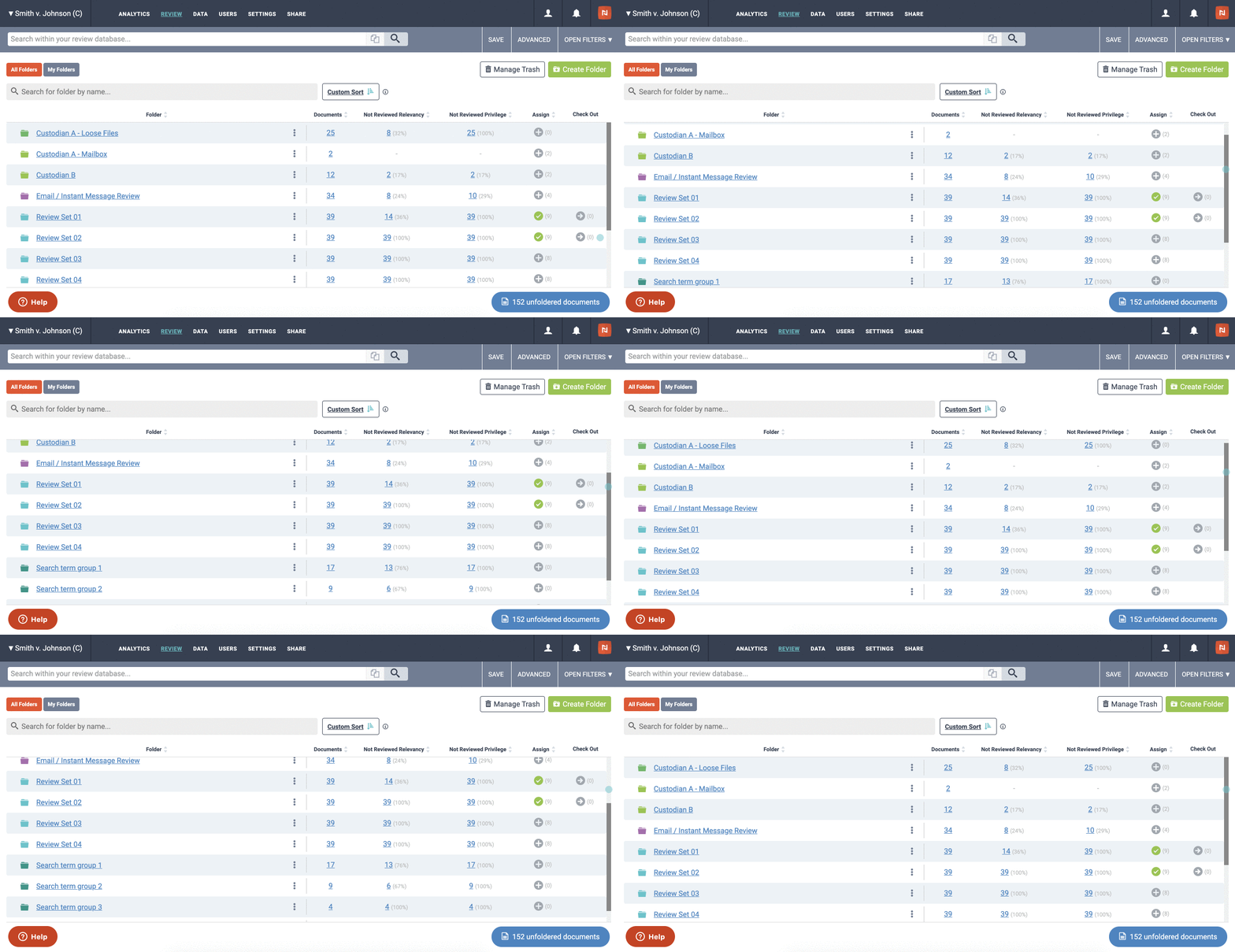
View All Folders
Users have the ability to view the total number of folders that could be easily viewed within their folder tree. This allowed users to view the number of documents within those folders. As previously mentioned, the earlier version was not able to be sorted, scrolled, and had a limit in the number of items. The folder and subfolder tree was a very helpful tool to navigate the folders to find folders and their search order.
Organize Folders Into Categories
Our users had the need to further organize their folders. For instance, all review folders could be nested into categories so that they could navigate to review categories. Categories also needed to include settings for the ability to update or remove a folder from its category, and the ability to add or remove sub-folder formatting.
Favorite Folders
Our users expressed the need for this feature very early. The favorite category was more than just the ability to sort or order the folder from the tree, but also a way to view it in the sidebar in each access point.
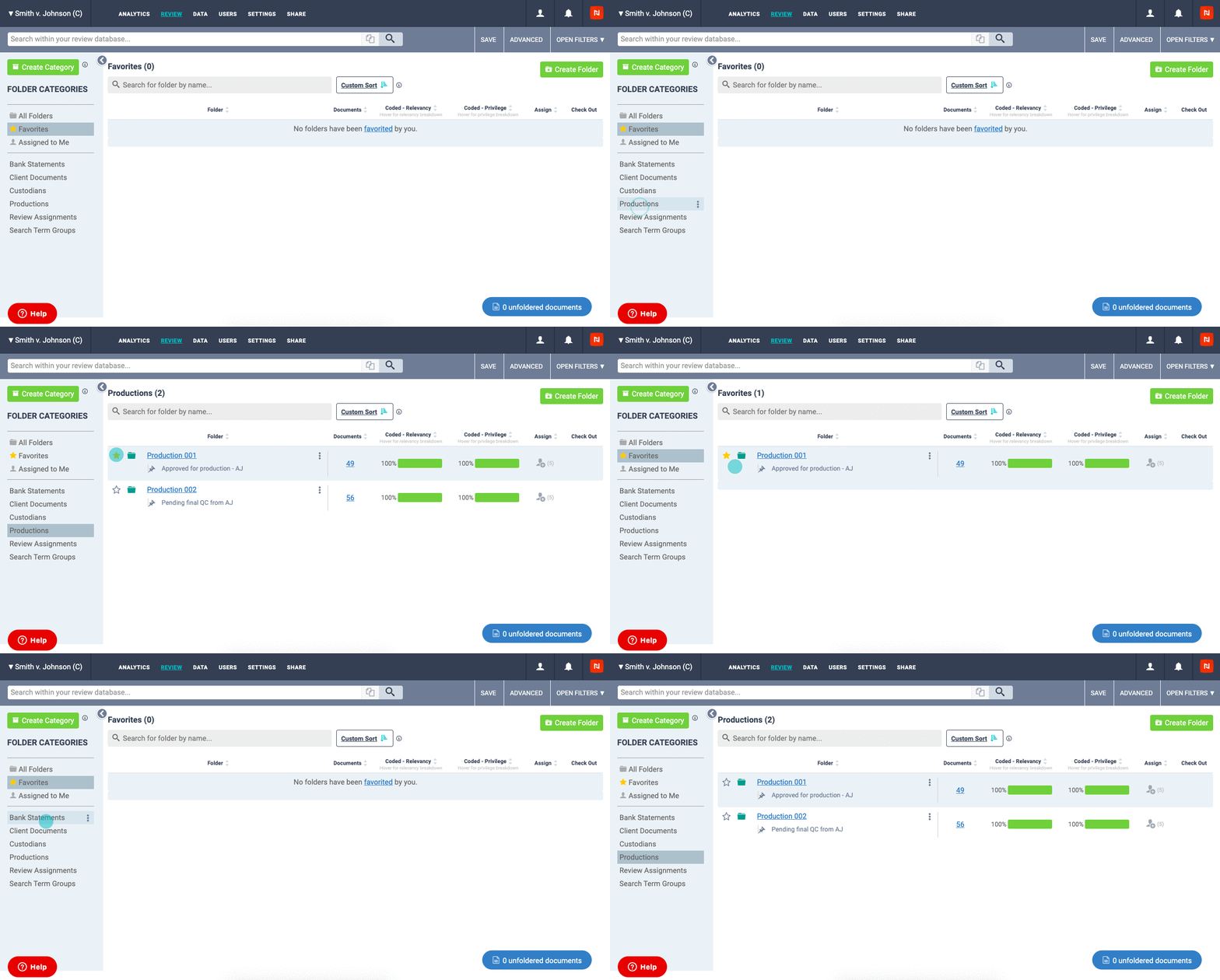
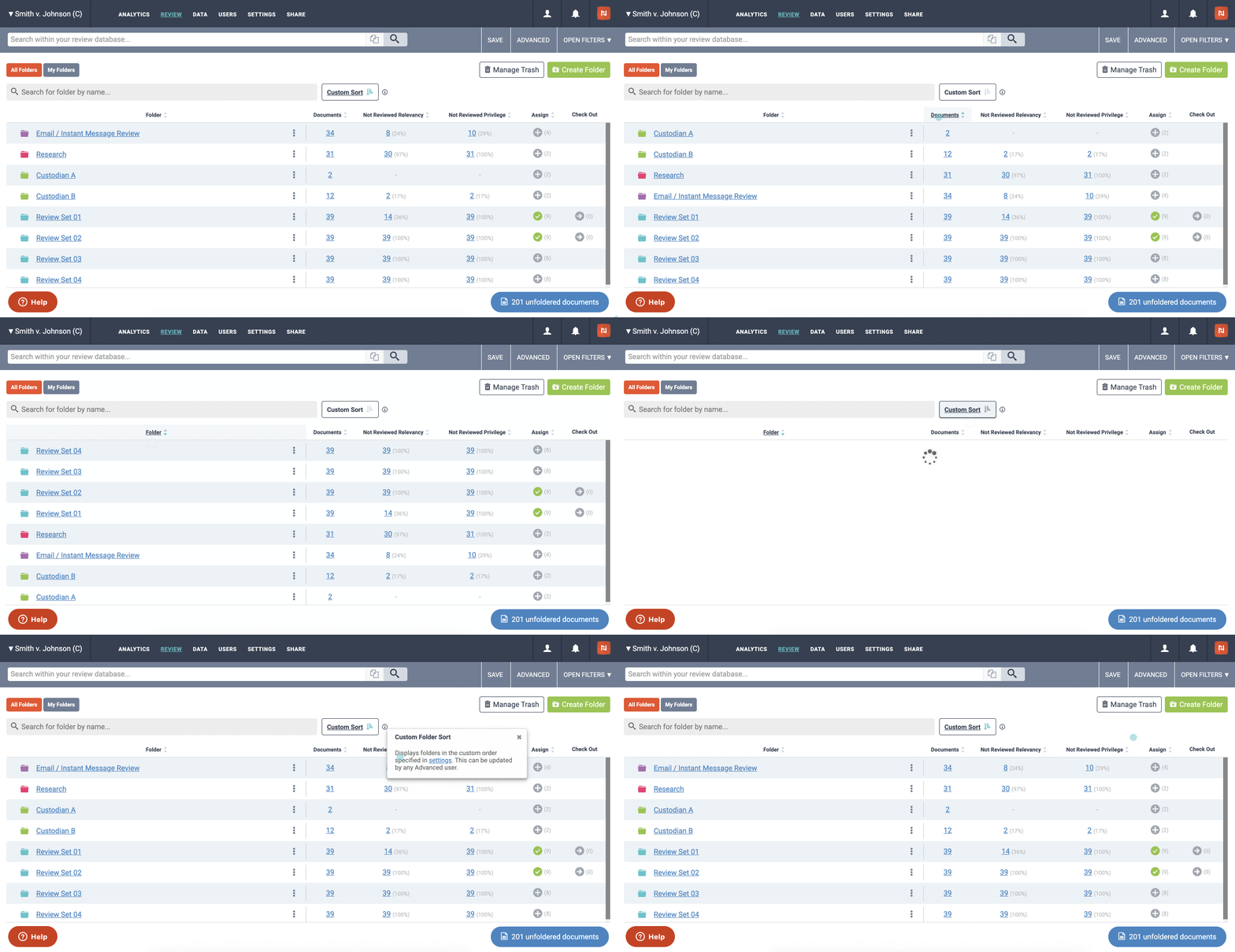
Search & Sort Functionality
Because of the way our folder table was structured, getting the input type required a data from all the columns, getting the view to work for users to properly filter the folder content. For a production file, we had to enable the ability to filter by folder contents. When a user was looking for something in a folder, they could sort the folders, find exactly what they were looking for, and the folder name is now an active link. This way, for landing, the sub-folder layout would take users to the folder so they could view all the contents from their folder home.
Project Takeaways
In the end, product and design, the project proved fully in a full rebuild was naturally done as part of the project and team. Each team had a group within the company from a different opinion on which should be tackled. When our finished product was fully developed and in our staging site, we set up a meeting with stakeholders to present the project and walk through it once as a review. They immediately understood that the focus had been quality work. Overall, once the project was in production, it was a good guide for our power users to easily better understand their folders.